Part 1: AI Photo Restoration Options Today
What To Know Before Using AI on Family Photographic History
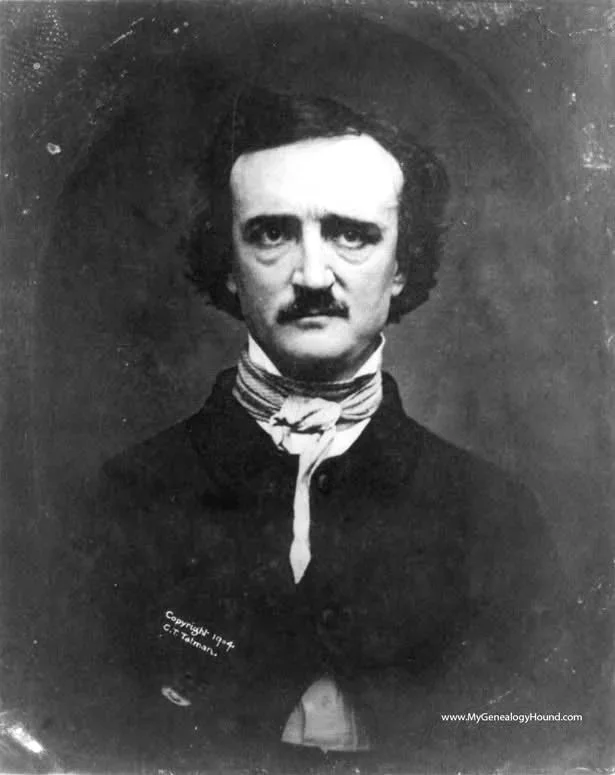
Original "Ultima Thule" daguerreotype of Edgar Allen Poe uploaded photo to AI
Introduction
In recent months, artificial intelligence (AI) photo restoration tools have become widely available. If you are relatively new to photo restoration or just curious what these new techniques can offer to you - social media sites, restoration apps, and online generators (especially well-known platforms like ChatGPT’s Images and Gemini’s Nano Banana) now promise fast, inexpensive ways to restore old photographs with just a few clicks or a prompt.
For families hoping to improve damaged or faded vintage photos, this can be tempting. Why not upload an image, let AI work its magic, and receive a clean, modern-looking result almost instantly?
The short answer - because convenience and quality are not the same thing, especially when it comes to preserving family history.
This article explains what AI photo restoration tools do well, where they fall short, and why skilled restorers use AI with traditional restoration techniques as the safer choice for photographs with historical, emotional, or archival value.
What AI Photo Restoration Tools Do Well
AI image tools have improved dramatically. Used appropriately, they can be helpful in certain situations.
AI tools can:
Improve contrast and brightness
Reduce visible noise or grain
Smooth surface imperfections
Generate visually pleasing results for casual viewing
For photos meant only for social media or small digital displays, AI restoration may be “good enough.”
However, looking good on a phone screen is very different from preserving an authentic historical photograph.
The Hidden Cost of “One-Click” Restoration
Most AI restoration tools, including ChatGPT and Gemini, work within strict resolution limits. When you upload a high-quality scan or digital image, the AI does not clean your original pixels. Instead, it creates a new, lower-resolution version of the image, reconstructed by the model.
This matters because:
Fine details from the original scan are discarded
Film grain and surface texture are replaced with approximations
Facial features, clothing details, and background elements may subtly change
The result cannot be returned to true archival quality later
Once this happens, the lost detail is gone permanently.
Restoration vs. Reinvention
Professional/technical photo restoration focuses on repairing what exists.
AI tools focus on re-creating what looks plausible.
That distinction is critical.
AI systems are trained on millions of modern images. When details are unclear, the software fills gaps based on probability - not historical accuracy. This can lead to subtle but meaningful changes in facial structure, clothing, and expression.
The image may look “better,” but it may no longer be true.
If You Decide to Use an AI Restoration Tool Anyway
Many people will reasonably decide that an AI-generated restoration is “good enough” for their needs - especially for a quick improvement of a family photo intended for casual viewing or sharing.
If you choose to use an AI image generator such as ChatGPT or Gemini, how you prompt the tool matters. Vague or minimal prompts often produce inconsistent results and encourage repeated passes, which can compound errors and distort the image further.
A single, detailed, carefully constrained prompt is generally safer than multiple light passes.
AI Prompt: Basic (Yields good results on family photos from the mid-1900s on)
“Restore this old photo to look as if it were taken today with a high-resolution modern digital camera. Refine and sharpen the background and make it realistic.”
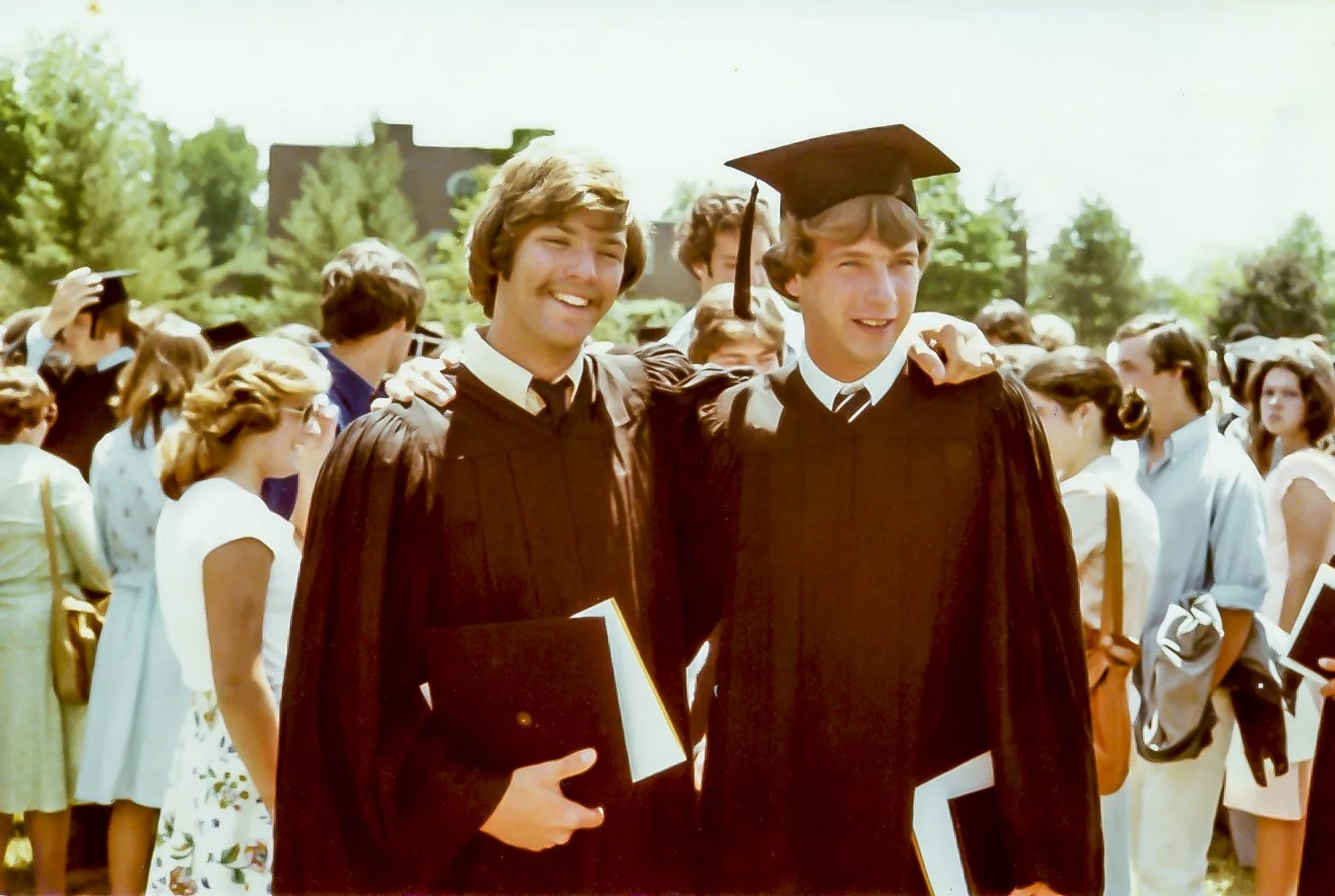
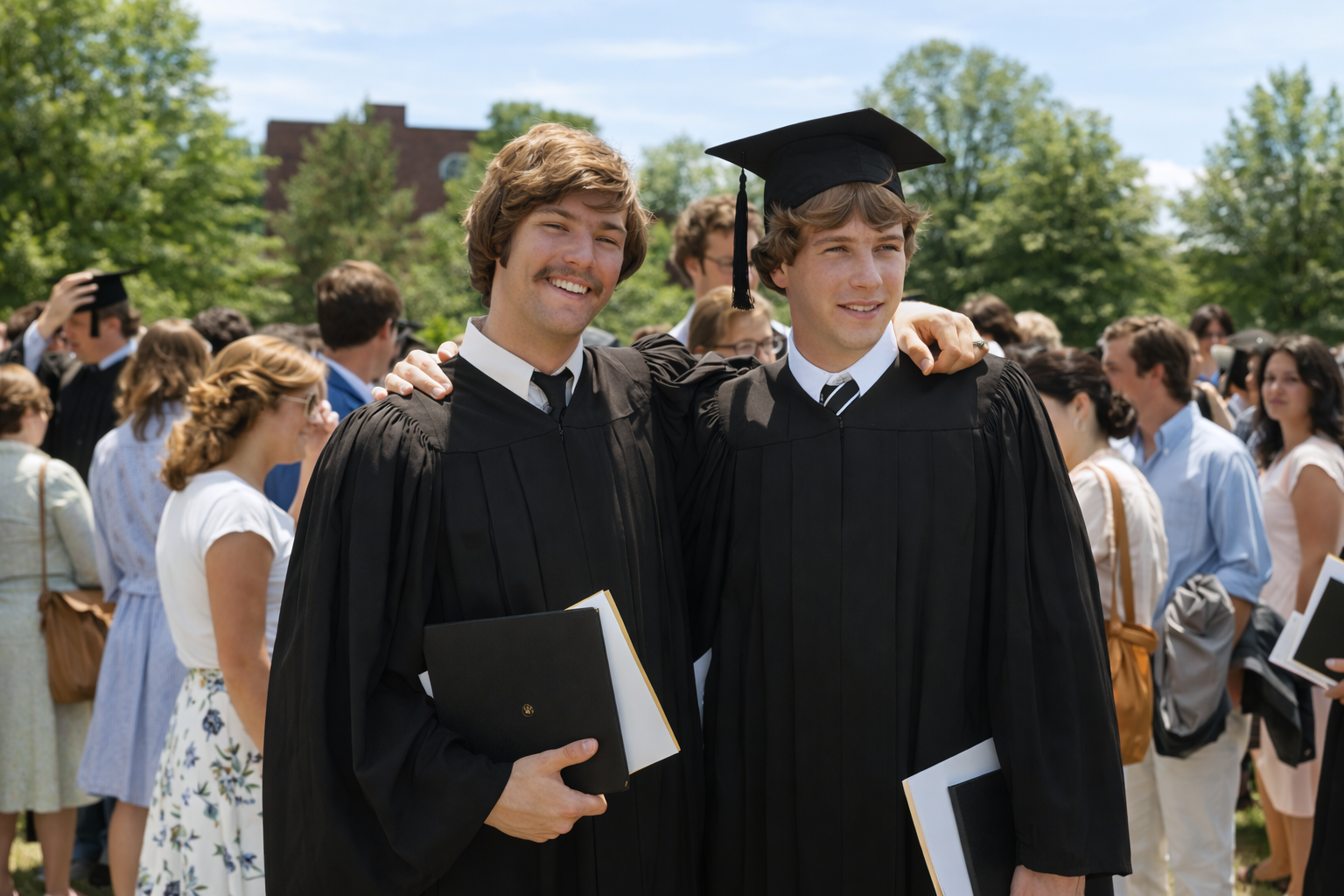
These results give a good ‘rendition’ of the original photo with only one pass but upon closer inspection many of the details of the individuals and background have been recreated to give a good proximity to the original but not a precise replication. Many newcomers to restoration will be very pleased with these results. For print sizes below 8”x10” they may be acceptable.
Below are example prompts designed to preserve as much of the original image as possible while still producing results that most consumers find satisfying. These prompts acknowledge tradeoffs and are intended for one-pass use only. A caution here - some may find these do not “modernize” the restorations enough.
AI Prompt: Single Portrait (One Person)
Use this or similar when the photograph centers on a single individual:
“Restore this photograph carefully while preserving the subject’s exact facial structure, proportions, expression, and identity. Do not alter bone structure, eye shape, nose shape, mouth shape, or overall likeness. Repair visible damage such as scratches, dust, stains, fading, or minor blur without inventing new details. Improve clarity and sharpness only where supported by the original image. Maintain natural skin texture and age-appropriate detail; do not beautify, smooth, or stylize the face. Preserve original lighting direction and shadow relationships. Clothing and background should be enhanced conservatively, without adding texture, patterns, or details that were not clearly present. The result should look like a clean, high-quality scan of the original photograph, not a modern reimagining.”
AI Prompt: Group Portrait (Two or More People)
Use this or similar when multiple people appear in the image:
“Restore this group photograph while preserving each individual’s facial structure, proportions, expression, and relative appearance exactly as shown. Do not modify any person to look younger, sharper, or more prominent than others. Repair damage such as scratches, dust, stains, and fading while maintaining consistent detail and contrast across all subjects. Avoid enhancing one face more than another. Do not invent facial details, hair texture, clothing features, or background elements. Preserve original spatial relationships, posture, and scale. The final image should appear as a faithful, cleaned version of the original group photograph, suitable for historical or family reference.”
AI Prompt: Scene, Landscape, or Environmental Photograph
Use this or similar when buildings, interiors, outdoor scenes, or environments are the primary subject:
“Restore this photograph by repairing damage such as scratches, dust, stains, fading, and uneven exposure while preserving the original composition and geometry. Improve clarity and tonal balance without adding, removing, or reshaping objects, structures, or natural features. Maintain realistic textures appropriate to the era of the photograph; do not introduce modern sharpness, stylization, or dramatic contrast. Preserve the original lighting conditions and atmosphere. The result should resemble a high-quality restoration of the original scene, not a modern reinterpretation.”
AI Prompt: Colorization (Optional, Applied After Restoration)
Colorization should always be considered interpretive rather than definitive:
“Apply colorization conservatively and in a historically appropriate manner based on the era suggested by the photograph. Preserve all facial features, textures, and structural details exactly as they appear in the restored image. Use natural, subdued colors consistent with period clothing, skin tones, and materials. Avoid modern color palettes, excessive saturation, or stylistic effects. This colorization should be considered an interpretive rendering, not a factual historical record.”
A Real-World Example Using the Same Prompt with 2 AI Platforms
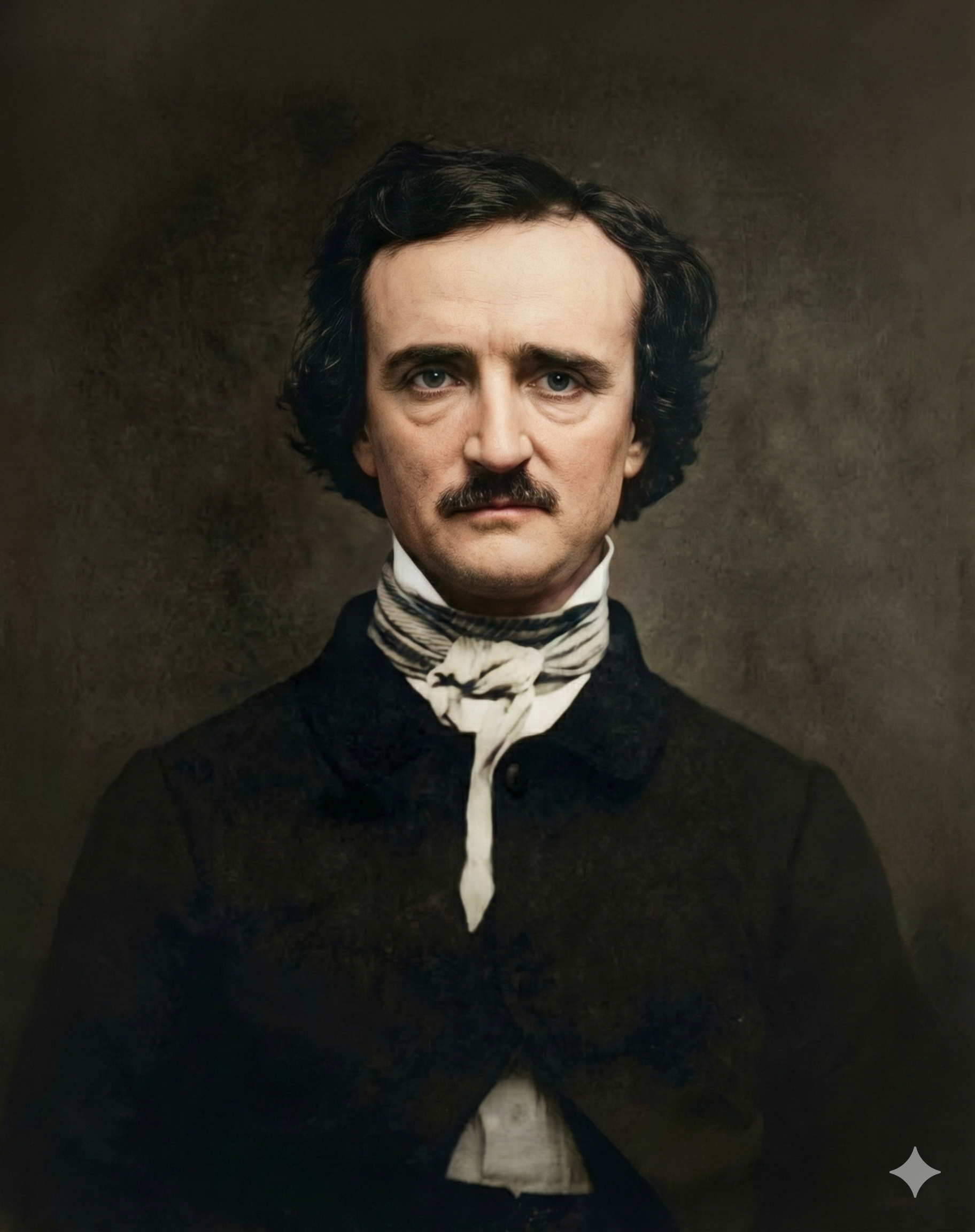
To better understand how modern AI image generators behave in practice, I tested the same restoration prompt on a well-known historical photograph of Edgar Allan Poe using both ChatGPT and Gemini.
The goal was not to “push” the AI creatively, but to constrain it as tightly as possible preserving identity, structure, and historical integrity while improving clarity and repairing damage in a single pass.
Below is the exact prompt used in both tools, without modification.
Verbatim Restoration Prompt Used:
“Restore and enhance this photo as if it were captured today with a high-end modern camera. Improve overall sharpness and fine detail without changing the subject’s identity or features. Enhance colors to look natural and vibrant (not oversaturated), correct white balance, and gently increase contrast and dynamic range. Reduce noise, fix blur or softness, and refine edges for a crisp, realistic look. Preserve authentic skin tones and textures, avoiding any artificial smoothing or stylization. The final image should feel clean, high-resolution, and true to the original scene, just clearer and more lifelike.”
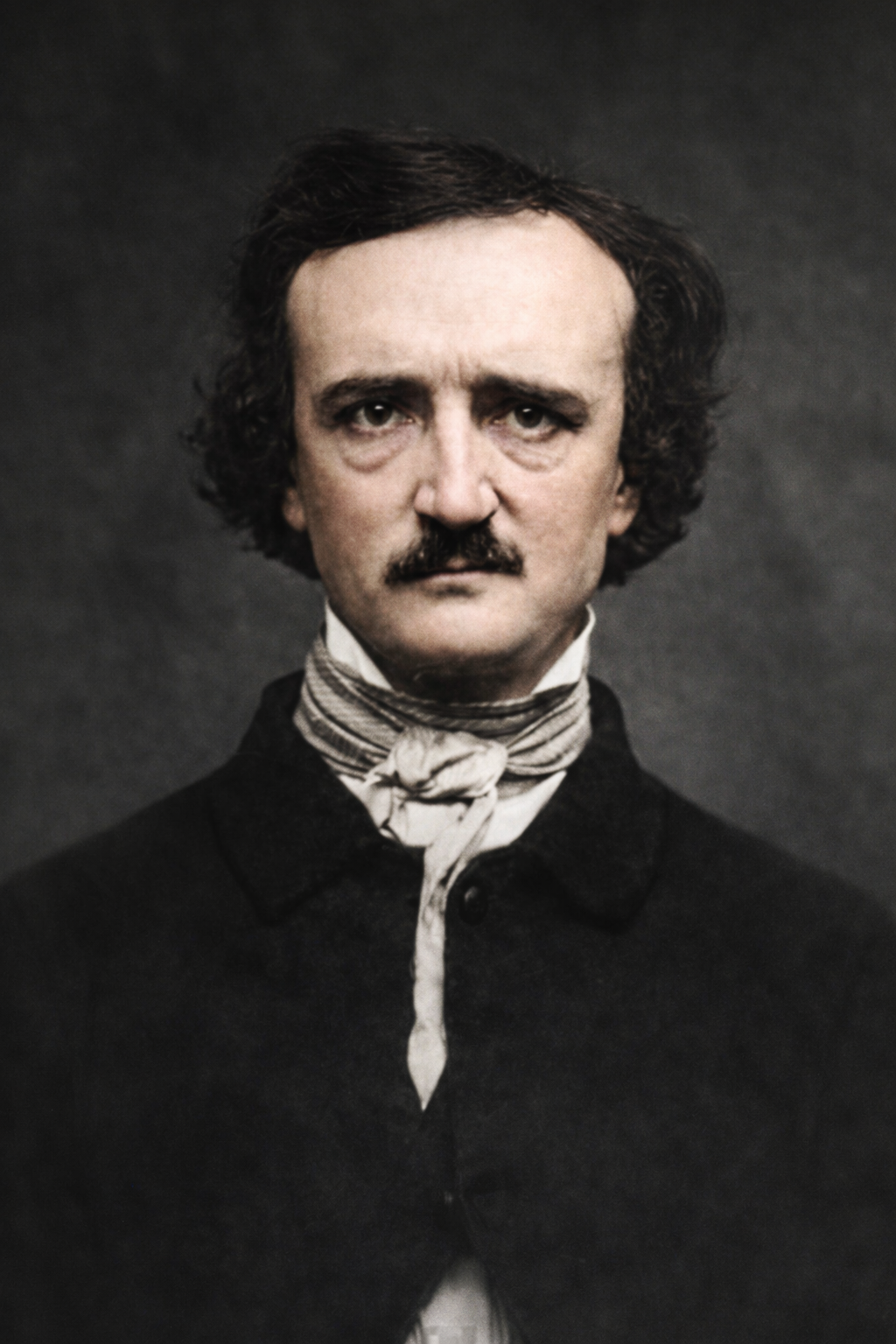
Using this same prompt, I generated one restored image in ChatGPT and one in Gemini.
At first glance, the results from both tools were impressive. Visible damage was reduced, clarity was improved, and each produced a visually engaging image in a single pass. For casual viewing, either result could reasonably be considered “good enough.”
However, closer inspection revealed important limitations.
In both cases, the face was prioritized heavily, resulting in a crisp, detailed portrait. Other areas - particularly clothing and background - were interpreted more loosely. Fabric texture became simplified, and background characteristics were generalized rather than preserved precisely. These changes were subtle, but noticeable when compared to the original photograph.
This illustrates a key point. Even when carefully prompted, AI image generators are still interpreting the photograph rather than restoring it in a conservation sense. The output may look appealing, but it is not a neutral preservation of the original data.
Below are the results produced using the same prompt in each tool. They demonstrate both the strengths of modern AI restoration and the reasons professional oversight remains important when accuracy, historical integrity, or long-term preservation matter.
Why A Combination of AI and Traditional Restoration Yields the Best Result
Skilled restorers work with high-resolution originals, not compressed web images.
A professional workflow typically includes:
High-resolution scanning of original photographs
Careful tonal and contrast correction
Manual repair of damage using precise tools
Preservation of original texture, grain, and facial structure
Optional colorization based on historical research
Restorers may use AI tools selectively, but always under human control.
Final Thoughts
AI photo restoration tools are powerful and improving rapidly. Used carefully, they can be helpful. Used casually, they can permanently alter history.
The difference is intent, restraint, and expertise.